




Apple Inc., founded in 1976, is a multinational technology corporation. The company primarily sells electronic devices and software. Among the product line, notable items include iPhone smartphones, iPad tablet computers, Mac personal computers, iPod portable media players, Apple Watch smartwatches, and Apple TV digital media players. Apple's software includes macOS, iOS, iPadOS, and watchOS operating systems, the iTunes media player, the Safari web browser, and the iLife and iWork creativity and productivity suites."

Verify if this transaction is fraud in 30 seconds
Download the SimplyWise app and connect your email account. SimplyWise will search through your emails and find all the receipts in your inbox. This allows you to understand what exactly you are paying for when you see a bank transaction on your statement.
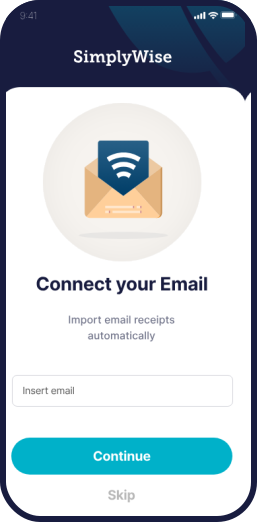
Connect to your bank account/credit card transactions through the secure (256 bit encryption) Reconciliation feature within the app.

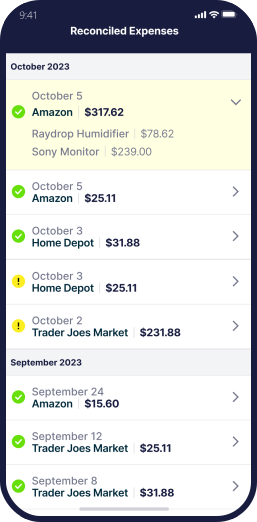
Reconcile the charges reported by your financial institution against what you've recorded in your SimplyWise account. Find fraud quickly! SimplyWise will match your transactions to your bank/credit card spending and check those items off.
Can't you just write scam!' No such thing as apple internet! Redundant BS!


What is Apple.com/bill? | Call@1-888-263-2649 | Apple.com/bill
If you see “apple.com/bill” on your credit card or PayPal statement, it usually refers to a charge made through the Apple App Store, iTunes, Apple Music, iCloud, or other Apple subscriptions. Many users mistake these charges for fraud, but most of the time they are linked to in-app purchases, app subscriptions, or shared family accounts. Why Am I Seeing Apple.com/Bill Charges? There are several reasons this appears on your statement: App or game subscriptions renewed automatically. iCloud storage upgrades. Apple Music, TV+, or News+ subscriptions. Purchases made by family members via Family Sharing. App Store or iTunes movie and music purchases. How to Check Your Apple.com Bill To identify what the charge is for, follow these steps: Open your iPhone/iPad ? go to Settings. Tap your Apple ID name ? select Subscriptions. Check your active or past subscriptions. On desktop, visit Apple Purchase History. Common Apple.com/Bill Issues Unrecognized charges: Often linked to a hidden