10 Photo to Estimate Apps for Contractors (2026)

Blog › Software Roundups

Software Roundup · 10 Tools

Photo to Estimate App: 10 Best Picks for Contractors in 2026

A side-by-side ranking of the best photo to estimate app options for contractors in 2026, scored on a weighted 100-point rubric covering estimate speed, measurement and takeoff accuracy from an image, material auto-population, export to a quote or invoice, and how cleanly each one turns a jobsite photo or room scan into a priced line-item estimate.

Updated May 25, 2026 Reviewed by SimplyWise editorial
13 min read
10 apps evaluated against a 5-criterion rubric
A contractor holding a smartphone up to a job site, the kind of professional using a photo to estimate app in 2026 to scan a room and price the work on the spot
A US contractor capturing a jobsite on a phone, the kind of operator turning a photo or room scan into a priced line-item estimate with a photo to estimate app. Photo via Unsplash.

A good photo to estimate app does one hard thing well: it turns a picture (or a room scan) into a priced, line-item estimate before the walk-through is over. However, the phrase covers a wide range of tools, from apps that measure an exterior off photos, to apps that build a 3D floor plan from a scan, to a true camera-to-quote workflow that prices the job on the spot. So a contractor shopping by that one search term can end up comparing very different products.

So the 10 apps ranked below were scored against the same weighted 100-point rubric, with photo-to-estimate capability as a first-class criterion rather than an afterthought. For example, where pricing is published on a vendor’s public pricing page and confirmed in our verified-facts database, the figure is stated. Meanwhile, where pricing is gated behind a sales call or not publicly listed, the entry says so explicitly and describes the tier qualitatively, so a contractor comparing options is not blindsided on the demo.

“92.2% of construction professionals use smartphones daily for work, more than laptops (79.7%) or tablets (62.1%).”JBKnowledge Construction Technology Report. The reason any photo to estimate app has to feel native on a phone, with the camera one tap away, not a desktop bid program dragged into the truck.

Below are the 10 best photo to estimate app picks for contractors in 2026, with honest pricing, what each one actually does with an image, and who each one is genuinely best for. In addition, the picks split into true camera-to-quote tools, photo-based measurement and takeoff apps, photo-documentation platforms, and full field service apps with built-in estimating, so a contractor can jump to the category that matches how they bid. For reference, SimplyWise Cost Estimator pricing is free to try, no credit card required, on a 7-day free trial, then from $15/mo.

Quick comparison: best photo to estimate app at a glance

Best-for, platform, what each tool does with a photo or scan, starting price, and free-trial length for every tool in this photo to estimate app ranking. Notably, SimplyWise Cost Estimator is highlighted because it is the only entry that turns a photo of a room into a fully priced line-item estimate in seconds, not just a measurement or a documented photo.

App Best for Platform Free trial What it does with a photo or scan
SimplyWise Cost Estimator Contractors who want a priced estimate built from a photo or room scan iOS, Android 7 days, no credit card Photo-to-estimate plus LiDAR room scan returns a priced line-item bid in seconds
Hover Exterior contractors who need accurate measurements from photos Web, iOS, Android Contact sales Builds a 3D model and exterior measurements from a set of property photos
CompanyCam Crews that document every job with timestamped, organized photos Web, iOS, Android 14-day free trial Captures, tags, and organizes jobsite photos; estimates via integrations
Joist Solo contractors who need free, simple estimates and invoices iOS, Android Free Basics tier Manual line-item estimates with branded PDFs; no photo measurement
Jobber Crews wanting scheduling plus estimating in one app Web, iOS, Android 14 days, no credit card Attaches job photos to quotes; manual line-item estimating
Housecall Pro Service shops that book recurring and repeat work Web, iOS, Android 14 days, no credit card Photos attach to jobs; template-based estimates, dispatch, and SMS
Handoff Remodelers who want a fast estimate drafted from a project description iOS, Android Free trial offered Drafts a detailed estimate from a typed scope; photos add context
Kukun Homeowners and contractors scoping renovation budgets early Web Free estimator Ballpark renovation cost estimates by project type and location
Knowify Commercial and remodel subs running detailed takeoff and job costing Web, iOS, Android 14-day free trial Plan takeoff and detailed cost estimating; manual line items
magicplan Contractors who want a floor plan and area count from a room scan iOS, Android Free trial offered Builds a floor plan from a room scan, then attaches estimate line items

Pricing and feature claims reflect each provider’s public pricing page as of May 2026. Verified competitor figures for Joist, Jobber, and Housecall Pro trace to the SimplyWise verified-facts database. Verify current rates before subscribing.

Our Top 3 Picks

Short on time? Start here.

The three apps that scored highest on the weighted rubric for the best photo to estimate app, with what each one is genuinely best at.

#1

Best Overall

SimplyWise Cost Estimator

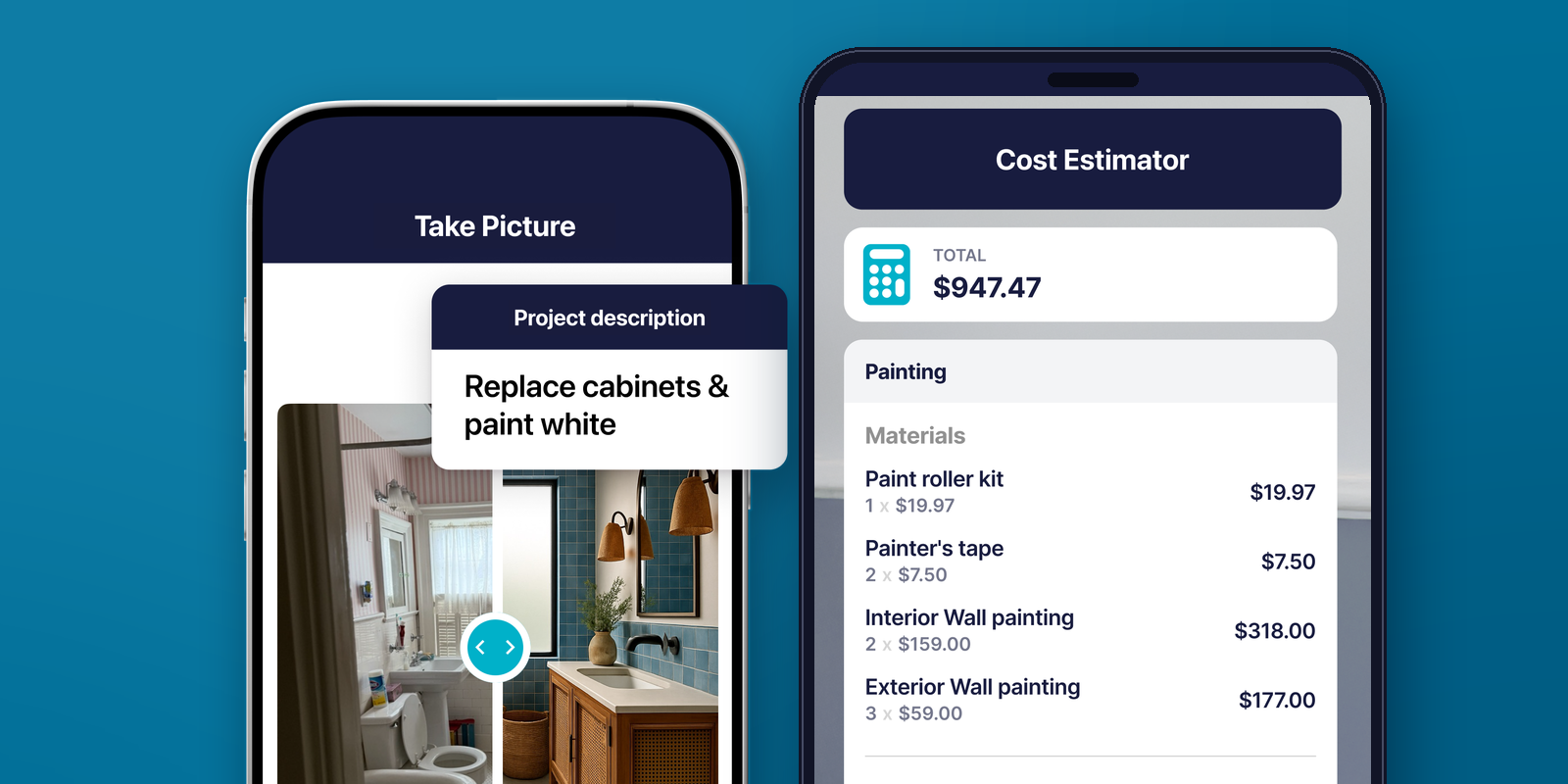
Photo-to-estimate plus LiDAR room scanning, included on every plan. Snap or scan a room and get a priced line-item estimate by surface in seconds. Built mobile-first for the contractor working out of the truck.

PricingFree to try; from $15/mo

#2

Best for Exteriors

Hover

Turns a set of property photos into a 3D model and precise exterior measurements for siding, roofing, and paint, the gold standard for measuring a building off the camera roll.

PricingQuote-only; contact sales

#3

Best for Job Photos

CompanyCam

The cleanest way to capture, tag, and organize every jobsite photo, then push that visual record into an estimate through its integrations with estimating tools.

Pricing14-day free trial; confirm tiers

The Full Ranking

The best photo to estimate app for contractors, ranked and reviewed

1

SimplyWise Cost Estimator

Best overall: photo-to-estimate and LiDAR room scanning that returns a priced bid in seconds.

7-dayfree trial

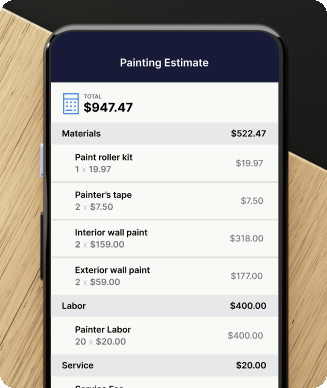
SimplyWise Cost Estimator is the cleanest pick for the best photo to estimate app because it is the only tool here that goes all the way from camera to priced quote. Photo-to-estimate and LiDAR room scanning run on every plan. Snap a photo of a room, a stairwell, a stained ceiling, or an exterior elevation, or scan a finished room with an iPhone Pro’s LiDAR sensor, and the app returns a priced material and labor breakdown in seconds, with the square footage already captured.

Notably, that is the difference between this and the measurement-only or documentation-only tools on the list: the photo does not just measure or get filed, it auto-populates a line-item estimate the contractor can send. From a single accent wall to a whole-room remodel, the contractor leaves with a customer-ready quote before the walk-through is over. Then a contractor can adjust line items, add or remove materials, layer in labor, and send a branded PDF straight from the phone.

What every plan includes. Also bundled at no extra cost are Receipts and Expenses and Mileage Tracker, which matter for any contractor tracking material runs to the supply house and miles between job walks. Pricing is free to try with no credit card required on a 7-day full-access trial, then from $15/mo.

Where it falls short. However, the honest tradeoff against larger field service platforms is clear: no built-in dispatch board, no customer SMS automation, no two-way QuickBooks sync yet, and no homeowner financing. For the solo contractor or small crew who needs to win the job on the first visit with a fast, professional, area-accurate bid, SimplyWise Cost Estimator is the best photo to estimate app, full stop.

Pros

+True photo-to-estimate: priced line-item bid in seconds

+LiDAR room scan captures square footage automatically

+Branded PDF quotes on every plan

+Free to try, no credit card required

Cons

No built-in dispatch board

No two-way QuickBooks sync yet

No customer SMS automation

2

Hover

Best for exteriors: 3D model and precise measurements built from a set of property photos.

Democontact sales

Hover is the standout photo-based measurement tool in this photo to estimate app ranking. A contractor walks the exterior of a house, takes a guided set of photos with the phone, and Hover stitches them into an accurate 3D model with detailed measurements for roofing, siding, windows, and exterior paint. In fact, for an exterior contractor who needs square footage, linear footage, and pitch off a property without climbing a ladder, the photo-to-measurement accuracy is the reason crews rely on it.

What it is, and is not. Hover produces measurements and a model, plus material lists and estimate workflows tied to those measurements, so it is closer to a measurement-and-takeoff engine than a one-tap camera-to-quote app. Similarly, pricing is not published on the public site at audit time, so a contractor has to contact sales, which is part of why it sits below a free-to-try camera-to-quote app for a solo operator just starting out. So confirm current pricing and trial terms directly with Hover before relying on them.

Best for. Therefore, for a roofing, siding, gutter, or exterior paint contractor whose bids live and die by accurate exterior measurements from photos, Hover is the most accurate photo-to-measurement option on this list. Meanwhile, for interior work or a contractor who wants the priced estimate built in one app, SimplyWise Cost Estimator handles the photo-to-estimate step end to end.

Pros

+Accurate exterior measurements from phone photos

+3D model with roofing, siding, and paint takeoffs

+Material lists tied to the measurements

Cons

Pricing not public, contact sales required

Built for exteriors, not interior rooms

Measurement engine, not one-tap quote

3

CompanyCam

Best for job photos: capture, tag, and organize every jobsite image, then feed it to an estimate.

14-dayfree trial

CompanyCam is the strongest photo-documentation tool in this photo to estimate app ranking. Every photo a crew takes is timestamped, location-tagged, organized by project, and synced to the whole team in real time, so the office sees the jobsite without driving to it. In fact, for a contractor who wants a clean, defensible visual record of before, during, and after on every job, CompanyCam is the category leader.

Where the estimate comes in. However, CompanyCam itself is built around documentation rather than turning a single photo into a priced estimate. Instead, it connects to estimating and field service tools through its integrations, so the photos a crew captures feed the estimate built in a partner app. Similarly, public pricing tiers should be confirmed directly with CompanyCam, and a 14-day free trial is offered, so verify current rates before subscribing.

Best for. So for a crew whose pain point is scattered job photos across a dozen phones, CompanyCam solves the documentation problem cleanly and pushes that record into the estimate. Meanwhile, for a contractor who wants the photo itself to produce the priced bid, the SimplyWise photo-to-estimate workflow does that in one app.

Pros

+Best-in-class jobsite photo documentation

+Timestamped, tagged, team-synced in real time

+Integrates with estimating and field service tools

Cons

Documentation tool, not a pricing engine

Estimate requires an integrated partner app

Confirm pricing tiers with vendor

4

Joist

Best free pick: the simplest way to send a clean line-item estimate from a phone.

FreeBasics tier

Joist is the simplest free entry point in this photo to estimate app ranking, though the honest caveat is that it is not actually a photo-driven tool. Joist runs Basics at $10 per month ($100 per year), Pro at $16 per month ($160 per year), and Elite at $32 per month ($320 per year); the free tier was discontinued, with QuickBooks sync included on the Pro and Elite tiers per the SimplyWise verified-facts database. However, the free Basics tier is capped at five documents per month, which is the most-cited reason contractors outgrow it once they are sending more than a handful of estimates.

For a contractor who only needs to build a quick line-item estimate, attach a job photo for context, send a branded PDF, and convert it to an invoice, Joist is mobile-first on iOS and Android and gets the job done with zero learning curve.

Where it falls short. Indeed, estimating is fully manual, with no photo-to-estimate, no measurement-from-photo, and no LiDAR, so the contractor still does the math by hand and the photo is just an attachment. So for a contractor whose only requirement is a free, clean estimate-and-invoice loop, Joist is the strongest free option here; for one who wants the bid built from a photo, the SimplyWise photo-to-estimate workflow is faster.

Pros

+Free Basics tier to start

+Mobile-first on iOS and Android

+QuickBooks sync included on Pro and Elite

Cons

Free tier capped at 5 documents per month

No photo-to-estimate or measurement

Manual line-item math, photo is attachment only

5

Jobber

Best general field service platform with built-in estimating and photo attachments.

14-dayfree trial

Jobber sits at $29 per month on annual billing for Core ($39 on a one-year commitment, $49 month-to-month), $99 per month annual for Connect, and $149 per month annual for Grow, with a Plus tier at $529 per month per the SimplyWise verified-facts database, with a 14-day free trial on full Grow features and no credit card required. For a crew that needs scheduling, a client hub, online quoting, integrated payments, and basic line-item estimates under one roof at a moderate price, Jobber is a solid generalist.

On the photo side, a contractor can attach job photos to quotes and work orders, but those photos are documentation rather than a measurement or pricing input, so the estimate itself is built from a saved item list by hand. Also, the Core tier is capped at one user, so the moment a partner or a second hand is added the price jumps to Connect.

Best for. Therefore, for a contractor comparing the photo to estimate app category, Jobber is the all-purpose generalist: not the strongest on photo-driven estimating, but a balanced platform for a one-truck-to-small-crew shop. However, for a contractor who wins on bid speed, the photo-to-estimate workflow in SimplyWise Cost Estimator beats Jobber’s manual line-item entry on time-to-quote.

Pros

+Balanced field service platform at moderate price

+Client hub plus integrated payments included

+Photo attachments on quotes and work orders

Cons

No photo-to-estimate or measurement-from-photo

Core tier capped at one user

Manual line-item estimating only

6

Housecall Pro

Best for repeat service work that needs dispatch, SMS, and photo-tagged jobs.

14-dayfree trial

Housecall Pro is the closest field service replacement for shops where dispatching and customer communication are the daily mechanics. Basic opens at $59 per month on annual billing ($79 month-to-month) for one user per the SimplyWise verified-facts database, and the 14-day free trial requires no credit card. For a contractor running a steady book of service work, recurring maintenance accounts, or repeat repairs, the dispatch board, SMS appointment confirmations, online booking widget, and integrated payments are all in one workflow, with job photos attached to each visit.

Where it falls short. However, the estimating side is template-based: a contractor builds quotes from a saved price list, so there is no photo-to-estimate or measurement-from-photo like the SimplyWise workflow, and quotes are typed by hand or pulled from a saved template. So for a shop where the operating model is schedule-and-dispatch first and the bid is a quick line-item template, Housecall Pro is a strong answer. Meanwhile, for a bid-driven contractor where the estimate IS the work, pair it with a true estimating app, or move SimplyWise Cost Estimator to the front of the workflow.

Pros

+Strong dispatch and scheduling for repeat work

+Customer SMS and online booking out of the box

+Job photos attached to each visit

Cons

No photo-to-estimate or measurement-from-photo

Estimating side is template-based

Basic tier capped at one user

7

Handoff

Best for remodelers who want a detailed estimate drafted fast from a project scope.

Freetrial offered

Handoff earns a slot in this photo to estimate app ranking for a different reason than the photo-measurement tools: it drafts a detailed, line-item remodel estimate from a typed project description, then lets a contractor refine the scope, materials, and labor before sending a professional proposal. In fact, for a remodeler who would rather describe the job (“repaint and re-trim a 12 by 14 bedroom, patch two walls, one closet”) and have a structured estimate come back than build it line by line from scratch, Handoff speeds up the drafting step.

What it is, and is not. However, the core input is the written scope, not the photo itself, so photos add context rather than driving a measurement or a price; treat it as a fast estimate drafter rather than a camera-to-quote tool. Similarly, specific pricing tiers should be confirmed directly with Handoff, and a free trial is offered, so verify current rates before relying on them. So for a remodeler who wants a polished estimate drafted quickly from a description, Handoff is a strong fit. Meanwhile, for a contractor who wants the square footage and the price built straight from a photo or scan, SimplyWise Cost Estimator is the closer match.

Pros

+Drafts a detailed estimate from a typed scope fast

+Structured line items for materials and labor

+Polished homeowner-facing proposals

Cons

Input is the written scope, not the photo

No measurement or square footage from an image

Confirm pricing tiers with vendor

8

Kukun

Best for early budget scoping: ballpark renovation costs by project type and location.

Freeestimator

Kukun rounds into this photo to estimate app ranking as an early-stage budgeting tool rather than a jobsite quoting app. The renovation cost estimator returns a ballpark figure for a project (a kitchen remodel, a bathroom, an addition) based on project type, scope selections, and location, which is useful for setting an expectation before a contractor ever measures a thing. In fact, for a contractor or a homeowner trying to right-size a budget at the kitchen-table conversation, a location-aware ballpark is a useful starting number.

What it is, and is not. However, Kukun is a planning and budgeting estimator, not a camera-to-quote tool: it does not measure from a photo, does not scan a room, and the output is a budget range rather than a line-item bid a contractor sends to win the job. Similarly, the core estimator is free to use, but confirm any paid features or pro tools directly with Kukun. So for early budget scoping and homeowner expectation-setting, Kukun is handy. Meanwhile, for the contractor who needs an accurate, sendable, photo-built line-item estimate, SimplyWise Cost Estimator is the tool that produces the bid.

Pros

+Free, location-aware renovation cost ballparks

+Useful for early budget expectation-setting

+Covers common remodel project types

Cons

Budget estimator, not a sendable bid

No measurement or photo-to-estimate

Confirm paid features with vendor

9

Knowify

Best for commercial and remodel subs running detailed takeoff and job costing.

14-dayfree trial

Knowify is the detailed job-costing and project-management pick in this photo to estimate app ranking, aimed at commercial and remodel subcontractors who bid from plans and need tight cost control across the job. The platform handles plan takeoff, detailed cost estimating, change orders, AIA-style progress billing, and job-cost tracking against budget, so a contractor can build a precise estimate and then track actuals against it as the work runs. In fact, for a sub whose bids come off blueprints and whose margin depends on job costing, that depth is the draw.

What it is, and is not. However, the estimating workflow is plan-and-takeoff driven and manual, not photo-built: a contractor measures off plans and builds line items rather than snapping a photo to get a price, and photos serve as documentation. Similarly, confirm current pricing tiers and the 14-day free trial directly with Knowify before subscribing. So for a commercial or remodel sub who lives in detailed takeoff and job costing, Knowify is a strong, purpose-built tool. Meanwhile, for a contractor who wants the fast photo-to-estimate path on residential work, SimplyWise Cost Estimator is the quicker route to a sendable bid.

Pros

+Detailed plan takeoff and cost estimating

+Job costing and AIA-style progress billing

+Built for commercial and remodel subs

Cons

Plan-and-takeoff driven, not photo-built

Heavier than a solo contractor needs

Confirm pricing tiers with vendor

10

magicplan

Best for floor plans from a room scan, with estimate line items attached.

Freetrial offered

magicplan closes out this photo to estimate app ranking as the floor-plan-from-a-scan specialist. A contractor walks a room with the phone, and magicplan builds a measured floor plan with room dimensions and area, then lets the contractor attach estimate line items, photos, and notes to that plan. In fact, for a contractor who wants an accurate floor plan and a square-footage count captured on site, the scan-to-floor-plan workflow is fast and the measured drawing is genuinely useful for both the bid and the homeowner.

What it is, and is not. However, the heart of magicplan is the floor plan and area capture, with estimating layered on top, so it is closer to a measurement-and-drawing tool with quoting attached than a one-tap camera-to-priced-quote app. Similarly, confirm the current pricing tiers and free trial terms directly with magicplan before subscribing. So for a contractor whose workflow benefits from a measured floor plan (insurance restoration, remodels, flooring), magicplan is a strong scan-based pick. Meanwhile, for the contractor who wants the priced line-item estimate to fall out of the photo or scan in seconds, SimplyWise Cost Estimator is the faster end-to-end path.

Pros

+Measured floor plan from a phone room scan

+Captures room dimensions and area on site

+Attach estimate line items and photos to the plan

Cons

Floor-plan-first, quoting layered on top

Not a one-tap photo-to-priced-quote tool

Confirm pricing tiers with vendor

What Contractors Say

Why contractors switched to a photo to estimate app

Real quotes from contractors who replaced their previous estimating workflow with SimplyWise Cost Estimator. For reference, reviews are sourced from Trustpilot and verified first-party feedback.

Verified Contractor★★★★★

“I started using SimplyWise to help with estimates. I didn’t have experience doing estimates. The ease of access was amazing.”

VC
Verified CustomerTrustpilot · March 2026

Verified Contractor★★★★★

“The prices it’s putting out are what we should be making. I wish everyone used it. Could actually make money in this business.”

NI
Contractor, Nampa IDVerified customer · 14 estimates sent

Verified Contractor★★★★★

“I run a business that uses this estimator tool daily. A task that used to take me hours now takes minutes, and I can get an estimate to a client and contract signed within the same visit.”

GR
Gopherwood Renovations, LLCTrustpilot · March 2026

How We Ranked

How we ranked the best photo to estimate app

Every app, including SimplyWise Cost Estimator, was scored against the same rubric on a 0 to 10 scale. Scores were weighted, summed, and normalized to a 100-point total. Pricing and feature claims trace to each vendor’s public pricing page or the SimplyWise verified-facts database, and are flagged where pricing is quote-only or not publicly confirmed.

30%
Estimate speed
Time from first walk-through to estimate sent. A true photo-to-estimate or scan workflow shortcuts the measure-up dramatically.
25%
Photo-to-estimate capability
How directly a photo or room scan becomes a priced estimate, from one-tap camera-to-quote to measurement-only to documentation-only.
20%
Measurement and takeoff accuracy
How reliably the app measures square footage, linear footage, or area from an image or scan instead of leaving it to hand math.
15%
Material auto-population and export
Whether materials and labor populate into line items, and how cleanly the result exports to a quote or invoice.
10%
Pricing transparency
Public pricing page, all-in pricing, no quote-only hidden tiers required just to get started.

Weights are tuned to the working contractor’s day-to-day: estimate speed and photo-to-estimate capability carry the most weight, because the whole reason a contractor searches for a photo to estimate app is to skip the slow measure-up and the hand math. For example, the rubric distinguishes a one-tap camera-to-quote workflow from a measurement-only tool like Hover, a documentation-only tool like CompanyCam, and a manual line-item tool like Joist, so two apps that both mention photos do not score the same.

Similarly, mobile usability sits inside estimate speed because 92.2% of construction professionals use smartphones daily for work per the JBKnowledge Construction Technology Report, ahead of laptops at 79.7% and tablets at 62.1%. In short, SimplyWise Cost Estimator was scored on the same rubric as every competitor.

Frequently Asked

Photo to estimate app: common questions

What is the best photo to estimate app in 2026?
For most contractors, SimplyWise Cost Estimator is the best photo to estimate app in 2026. Indeed, it turns a photo or a LiDAR room scan into a priced line-item estimate in seconds, runs mobile-first on iOS and Android, and is free to try with no credit card required, then from $15/mo on a 7-day free trial. For exterior measurements off photos, Hover is the most accurate measurement tool. For organizing jobsite photos, CompanyCam is the documentation leader, though both produce a measurement or a photo record rather than a finished, sendable bid the way the SimplyWise workflow does.
Is there an app that turns a photo into an estimate?
Yes. SimplyWise Cost Estimator is the app on this ranking that builds a priced estimate directly from a photo. Snap a photo of a room, a stairwell, a ceiling, or an exterior elevation, and the app returns a material and labor breakdown by surface in seconds, with the square footage captured for you. Hover and magicplan also use the camera, but Hover produces exterior measurements and magicplan produces a floor plan, while Joist, Jobber, Housecall Pro, Knowify, Handoff, and Kukun use manual, plan-based, or description-based estimating instead of building the price from the photo itself.
How much does SimplyWise Cost Estimator cost?
SimplyWise Cost Estimator is free to try, no credit card required, on a 7-day full-access trial, then from $15/mo. Notably, every plan includes photo-to-estimate, LiDAR room scanning, branded PDF quotes, and access to the rest of the SimplyWise suite (Receipts and Expenses, Mileage Tracker) at no extra cost. In addition, there is no per-user pricing for a solo contractor.
How accurate is a photo to estimate app?
Accuracy depends on the method. A LiDAR room scan, like the one in SimplyWise Cost Estimator, captures real wall lengths and ceiling heights from the phone’s depth sensor, which is more reliable than eyeballing dimensions. Photo-based measurement tools like Hover stitch a guided photo set into a 3D model for exterior measurements. However, every estimate should be reviewed before it goes out: a contractor confirms the captured square footage, adjusts line items, and accounts for site conditions a camera cannot see, like substrate condition or access. So treat the photo-built number as a fast, accurate first draft, then sanity-check it.
What is the difference between a photo to estimate app and a measurement app?
A measurement app like Hover or a floor-plan app like magicplan turns photos or a scan into dimensions: square footage, linear footage, or a measured drawing. A documentation app like CompanyCam organizes jobsite photos. A photo to estimate app goes one step further and turns the captured image into a priced, line-item estimate the contractor can send. SimplyWise Cost Estimator is the one tool here that does the full camera-to-quote step, which is why it ranks first; the measurement and documentation tools are excellent at their step but hand the contractor a number or a photo record, not a finished bid.
What is the best photo to estimate app for exterior work?
For exterior contractors (roofing, siding, gutters, exterior paint), Hover is the strongest photo-based measurement tool: a guided photo set becomes a 3D model with accurate exterior measurements and material takeoffs, so the bid is built on real numbers without a ladder. Meanwhile, SimplyWise Cost Estimator still prices an exterior fast from a photo of the elevation and produces a sendable line-item quote. For a multi-trade exterior operation that also wants documentation across crews, CompanyCam pairs well with either.
Can a photo to estimate app sync with QuickBooks?
Joist includes QuickBooks sync on its Pro and Elite tiers, Jobber offers QuickBooks Online integration, and Housecall Pro syncs with QuickBooks (the depth depends on the tier). However, SimplyWise Cost Estimator does not currently offer two-way QuickBooks Online sync, but estimates and invoices export to PDF for manual entry. So for a contractor whose accountant lives in QuickBooks Online, a common setup is SimplyWise on the front end for fast photo-built bidding and a syncing tool on the back end for the books.
What other photo and estimating tools did not crack this top 10?
A few additional tools come up in contractor discussions but did not crack the top 10 on the weighted rubric for the best photo to estimate app: EagleView for aerial roof measurement reports from imagery, RoomScan and Canvas for room and space scanning, and Buildxact for remodelers who need plan takeoff plus estimating. Each has a narrower fit than the 10 ranked above, but for a contractor whose primary need is one of those specific niches, they are worth comparing alongside the closest entry from this ranking.

Sources

Sources and verification

Verified competitor facts (SimplyWise verified-facts database, last verified 2026-04-30): Joist tier ladder and free-tier document cap; Jobber tier ladder, user caps, and 14-day trial; Housecall Pro Basic tier and 14-day trial.

Mobile usage stat: JBKnowledge Construction Technology Report, via Viewpoint (92.2% of construction professionals use smartphones daily; 79.7% laptops; 62.1% tablets).

Vendor public pages referenced: hover.to, companycam.com, handoff.ai, mykukun.com, knowify.com, and magicplan.app. Pricing for Hover, CompanyCam, Handoff, Kukun, Knowify, and magicplan is quote-only or not confirmed in the verified-facts database; features and tiers were described qualitatively and should be confirmed with each vendor before subscribing.

SimplyWise Cost Estimator: free to try, no credit card required, on a 7-day free trial, then from $15/mo. Photo-to-estimate and LiDAR room scanning included on every plan.

The Best Photo to Estimate App

Build your next estimate from a photo in seconds

Photo-to-estimate plus LiDAR room scanning, both included on every plan. Snap a room or scan it, get a priced line-item estimate by surface, send a branded PDF quote, and track receipts and mileage in the same app. Free to try, no credit card required, on a 7-day free trial, then from $15/mo.